
You wouldn’t hire a commercial electrician to configure your enterprise database. You wouldn’t ask your HVAC provider to manage your cloud backups.
So why do so many business owners give a traditional low-voltage installer full access to their perimeter firewall and core business network?
For decades, physical security was straightforward: run cable, mount hardware, terminate connections, and verify it works. But today, nearly every security device—IP cameras, NVRs, access control panels, intercoms, and gateways—is a specialized computer living on your network.
That shift changes everything.
Unfortunately, much of the legacy alarm and low-voltage industry hasn’t kept pace. Many technicians know just enough networking to get a system online and a mobile app connected—and just enough to introduce serious cybersecurity risk.
The “Make It Work” Mindset: How Risk Gets Introduced
When a traditional installer is asked to enable remote viewing or remote door control, the goal is usually simple: make the app work before leaving the site.
Without deeper network security training, that often leads to high-risk shortcuts.
1) Punching Holes Through the Firewall
To enable remote access, some installers create inbound access rules on the router/firewall. When inbound access is opened improperly, it can expose internal security devices to the public internet.
That’s not “remote access.” That’s an unlocked door.
2) Enabling UPnP (Universal Plug and Play)
UPnP can allow devices to request inbound access automatically. In business environments, this removes oversight and can create unexpected exposure—especially when devices are added, replaced, or reset over time.
3) Putting Security Devices on a Flat Network
Legacy installs often place cameras and access control on the same network as:
- Accounting workstations
- POS systems
- File servers
- Customer and employee data
To an installer, if the app connects, the job is done. To an attacker, a compromised edge device can become a pathway to higher-value systems.
Digital Technical Debt: The Hidden Danger of “Forgotten Rules”
The risk doesn’t disappear when a system is upgraded. In many cases, it gets worse.
A common scenario:
- Remote access is enabled years ago to support an older DVR/NVR or access system.
- That hardware is later replaced or removed.
- The original firewall/router rules remain in place.
Those leftover configurations can sit quietly for years—creating unnecessary exposure and increasing the attack surface of your network edge.
This is one of the most common problems we see: not just what’s installed today, but what was configured years ago and never cleaned up.
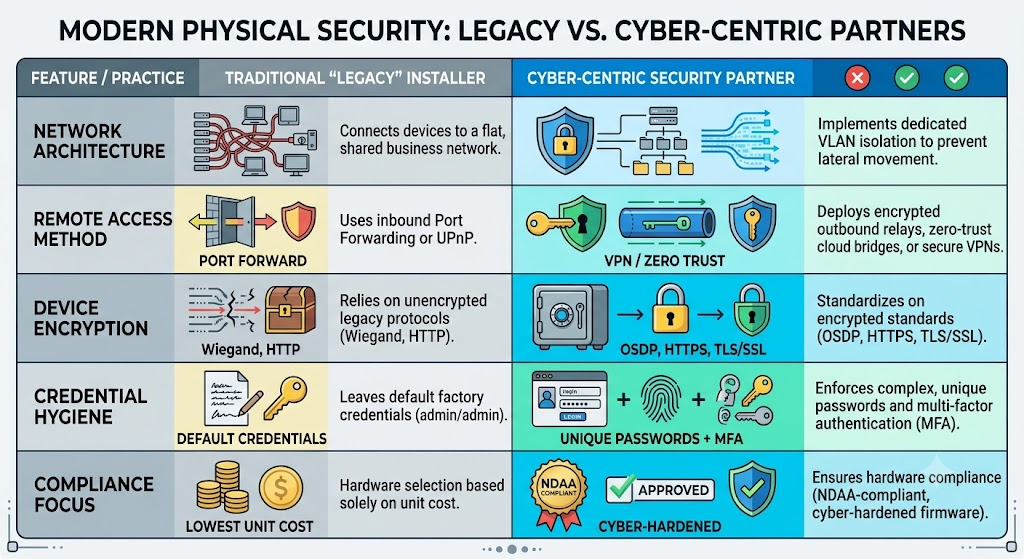
Legacy Installer vs. Cyber-Centric Security Deployment
Modern physical security must be designed, deployed, and maintained with the same rigor as business IT infrastructure.
Here’s the difference:
Hardening the Physical Edge (Without Compromising the Network)
A modern deployment isolates physical security assets so that even if an exterior camera or device is tampered with or compromised, it cannot become a bridge into your business systems.
That requires:
- VLAN segmentation: Cameras and controllers on restricted network segments
- Firewall auditing and cleanup: Removing unnecessary inbound exposure and legacy rules
- Secure standards: Favoring encrypted protocols and hardened configurations
- Credential and firmware management: Eliminating defaults and keeping devices updated
Don’t Wait for a Hardware Refresh to Fix Network Exposure
If your security vendor’s networking strategy begins and ends with “make the app connect,” your business may be carrying unnecessary risk.
At Systems Integrations, we combine deep physical security expertise with network and infrastructure hardening resources—so your building stays protected without sacrificing your cybersecurity posture.
Get a Cyber-Focused Physical Security Assessment
Before your next camera upgrade, access control refresh, or system replacement, we can audit your current environment to identify hidden exposure, clean up legacy configurations, and recommend a secure, network-hardened path forward.