
Last Updated: October 25, 2026
Quick Summary
Secure integration of building security systems connects access control, video surveillance, intrusion detection, and building management into a unified network with rigorous cybersecurity controls, enabling real-time data sharing, faster incident response, and centralized management instead of isolated silos.
- Network segmentation isolates security devices from corporate networks to prevent lateral movement if one system is compromised.
- Access control and video surveillance integration timestamps events and links them to video footage, compressing response time from minutes to seconds.
- Every administrative interface requires unique named accounts, multi-factor authentication, and role-based permissions to prevent shared local-admin accounts.
- Testing must include component verification, integration-point testing, cybersecurity scanning, and failover testing before go-live handoff.
- Ongoing maintenance on a monthly, quarterly, and annual cadence keeps integrated systems secure and operational throughout their lifecycle.
Table of Contents
- What Secure Integration of Building Security Systems Means
- Security System Network Segmentation and Architecture
- Access Control and Video Surveillance Integration
- Cybersecurity for Physical Security Systems
- Choosing the Right Security Integrator Selection Partner
- Testing, Commissioning, and Ongoing Maintenance
- Planning Your Secure Integration Project
- Frequently Asked Questions
What Secure Integration of Building Security Systems Means
The secure integration of building security systems connects access control, video surveillance, intrusion detection, and building management into a unified network with rigorous cybersecurity controls.
Most facilities buy components separately from different vendors, creating blind spots: a breach in one system doesn’t alert the others, data crosses networks without consistent encryption, and failures mean calling three companies instead of one.
Secure integration centralizes management, enforces consistent policies across devices, and creates a single point of visibility. At Systems Integrations, we’ve guided enterprises through this convergence, bridging physical security infrastructure with IT best practices.
Security System Network Segmentation and Architecture
Network segmentation isolates security devices from general corporate networks, preventing lateral movement if one system is compromised.
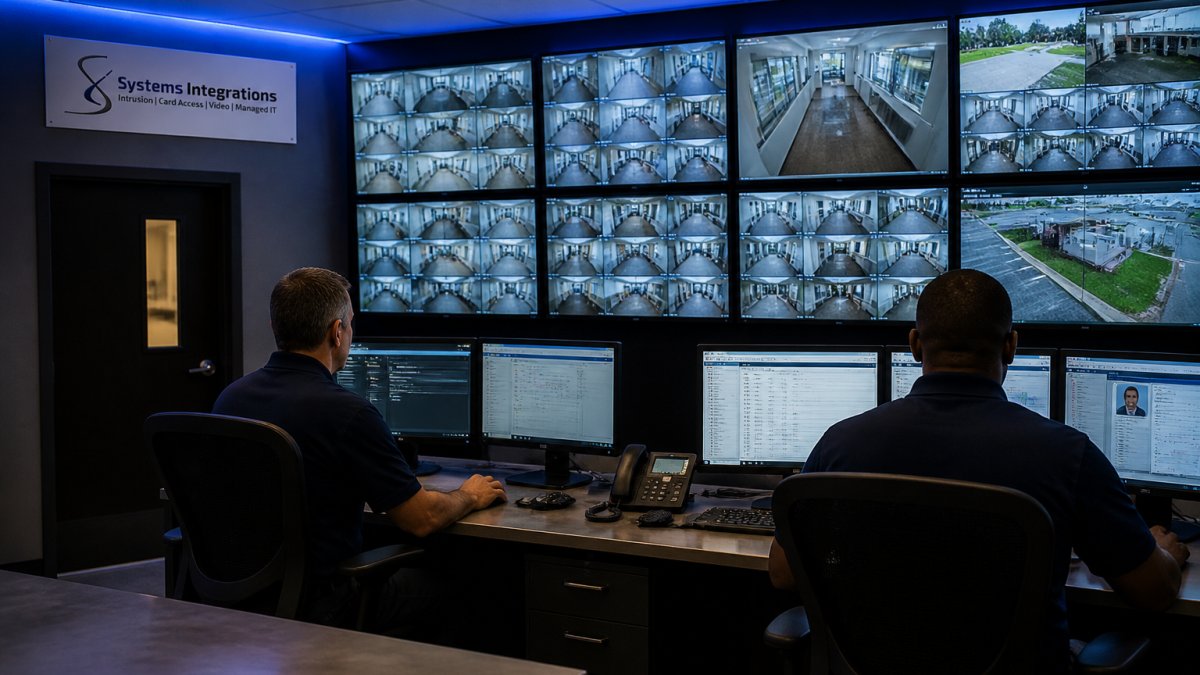
A properly segmented architecture layers access control, video surveillance, and building automation on separate segments, with a secure gateway controlling data flow between them.
Implementation requires identifying which devices belong in each segment, what data must flow between them, and configuring firewalls and switches to enforce those rules.
Centralized monitoring from a secure operations center gives real-time visibility across all segments.
Access Control and Video Surveillance Integration
Access control and video surveillance form a powerful pair when integrated.
Integration starts with synchronization. Access control and video management must run on clocks synced to the second, a one-second drift matches the wrong frame to the wrong event.
The real value emerges in automated response.
Data sharing requires cybersecurity attention: moving video feeds and access logs across segments demands encrypted tunnels, authentication tokens, and audit logs.
Systems Integrations recommends cybersecurity risks in physical security infrastructure as essential reading before designing your integration.
Cybersecurity for Physical Security Systems
Converged security systems introduce attack surfaces traditional physical security never faced. Access control panels speak IP, cameras stream to networked video management software, and building automation controllers accept commands from anywhere on the network. Each connection is an entry point that needs a control.
The threat model isn’t what most teams expect. Attackers rarely want footage; common objectives include disabling access control during a theft, altering audit logs to erase evidence, triggering nuisance alarms to pull guards away, and pivoting from a camera or NVR into the corporate IT network.
Start with a threat model, not a product list
Before selecting controls, document what you are defending and from whom. A practical threat-modeling exercise covers four questions:
- Assets, cardholder data, video recordings, door schedules, alarm configurations, and the physical spaces those systems protect.
- Adversaries, opportunistic insiders, credential-stuffing attackers, supply-chain compromise of a device vendor, and physical intruders seeking to disable alarms.
- Attack paths, default credentials on a camera, an unpatched NVR, a shared VLAN between HVAC and access control, a vendor remote-access tunnel with no MFA.
- Impact, what happens if each asset is read, modified, or made unavailable, and how long the facility can tolerate that outage.
Map results against a recognized framework: NIST Cybersecurity Framework 2.0 for assigning controls, NIST SP 800-82 Revision 3 for operational technology, and ASIS/SIA guidance as a cross-check. You don’t need certification, but you should point to a control for every function.
The controls that actually matter
Identity and access management. Every administrative interface, camera web UI, access control head-end, BAS controller, needs unique named accounts, multi-factor authentication, and role-based permissions.
Device hardening. Change default credentials at commissioning, not later. Disable unused services (Telnet, FTP, UPnP, mDNS).
Logging, monitoring, and detection. Forward device and application logs to a central SIEM.
Resilience and fail-safe design. Decide, per door and per zone, what happens when the network or head-end is unavailable.
Where integrations leak
The riskiest moments in a converged system are the seams: the API between access control and video, the integration account that lets the VMS pull cardholder data, the building automation gateway that reads occupancy from access events.
Cybersecurity isn’t a phase you complete before go-live; it’s a set of controls you operate and update for the life of the system, which is why the testing and maintenance practices below matter as much as the architecture.
Choosing the Right Security Integrator Selection Partner
Your integrator is your single point of contact for design, installation, and ongoing management of your secure integration.
Look for integrators who demonstrate cybersecurity expertise, not just installation experience.
Verify that your integrator carries cyber liability insurance. This protects you if their work introduces a security vulnerability that results in a breach.
Ask about legacy integration. Most facilities have older components never designed for network integration, can the integrator bridge them securely, or insist on replacing everything?
Finally, understand their support model: response times and 24/7 availability for critical issues. For integrated systems, downtime isn’t just inconvenient, it’s a security risk, so you need a partner who treats outages as emergencies.
Testing, Commissioning, and Ongoing Maintenance
Most integration failures are commissioning failures: the system was specified and installed correctly, then handed over without anyone proving alarms reach the right people, failover works, or permissions behave under stress. Here’s a practical sequence for proving the system works.
Phase 1: Component-level verification
Test each subsystem in isolation before connecting anything. For access control, verify every reader with valid, invalid, and tailgate attempts, and confirm door-held-open and forced-door alarms. For video, confirm recording on every camera, check retention against policy, and validate analytics trigger only where configured. For intrusion, walk-test every sensor and confirm zone mapping. Document pass/fail per device as your acceptance record.
Phase 2: Integration-point testing
This is where most projects skip steps. Build a test matrix that pairs each integration with the event it is supposed to produce, then execute every row:
- Card swipe at a named reader → correct camera begins recording and the event appears in the VMS timeline within an agreed latency (commonly under two seconds on a local network).
- Denied access (wrong card, wrong schedule, wrong zone) → alarm generated, video tagged, notification delivered to the monitoring queue.
- Door forced or held open → alarm plus video bookmark plus operator acknowledgment logged.
Record the expected result and the observed result for each row. Any mismatch is a punch-list item, not a training issue.
Phase 3: Cybersecurity and failover testing
Run vulnerability scans against every networked device and remediate critical findings before go-live. Confirm default credentials are gone, MFA is enforced on admin accounts, and audit logging captures administrative actions. Then test failure modes deliberately:
- Disconnect the network link to a controller and confirm local door behavior matches the fail-safe/fail-secure decision and that the outage alarms at the head-end.
- Power down the VMS server and confirm access control continues to function and that operators are alerted.
- Simulate a head-end outage and verify that local recording (edge storage on cameras or NVRs) continues and that video is retrievable after restoration.
Phase 4: Commissioning and handoff
Commissioning is the formal transition from installation to operations. The deliverable is a documentation package: as-built network diagrams with VLANs and firewall rules, a device inventory with firmware versions and end-of-support dates, configuration backups for every head-end, the completed test matrix, operator runbooks, and a training record. Without configuration backups, a failed controller becomes a multi-week replacement.
Ongoing maintenance cadence
Integration does not end at handoff. A workable maintenance schedule looks like this:
- Monthly, review audit and alarm logs for anomalies; confirm backups completed; check for vendor security advisories affecting installed devices.
- Quarterly, apply firmware and software patches on a tested schedule; review user accounts and remove departed staff and expired vendor access; re-run vulnerability scans.
- Annually, full functional retest of the integration matrix; review retention and privacy policies against current practice; update the threat model; tabletop an incident scenario (for example, access control head-end ransomware) with operators and IT.
Track measurable outcomes: alarm response time, uptime per subsystem, false-alarm rate by device type, mean time to resolve incidents, and percentage of devices on supported firmware. These turn “the system is working” into evidence you can act on.
A practical maintenance schedule keeps integrated systems secure and operational throughout their lifecycle.
|
Maintenance Activity |
Frequency |
Key Actions |
|---|---|---|
|
Review logs and backups |
Monthly |
Check audit logs, confirm backups completed, review advisories |
|
Apply patches and updates |
Quarterly |
Deploy firmware patches, remove departed staff access, rescan |
|
Full functional retest |
Annually |
Retest integration matrix, review policies, update threat model |
|
Incident tabletop exercise |
Annually |
Simulate scenarios like ransomware with operators and IT |
Planning Your Secure Integration Project
Next, define your security requirements. What are you protecting, and what are your compliance obligations?
Then assess your network infrastructure: bandwidth for continuous video streaming, reliable power and backup, and IT resources to support networked security devices.
Create a phased implementation plan. Most organizations can’t replace everything at once.
Work with your integrator to create a secure integration roadmap covering your current state, target state, and the steps to get there, including timelines, budgets, resource requirements, risk mitigation, and which legacy systems you’ll retire versus integrate.
Throughout planning, prioritize cybersecurity. A breached integrated system is worthless; a less feature-rich system that’s secure and well-maintained is far more valuable.
The secure integration of building security systems is a strategic investment that requires careful planning, the right partner, and ongoing commitment. Systems Integrations has guided enterprises through this process, delivering cybercentric security integration that bridges IT and physical security while maintaining operational compliance and reducing risk.
Frequently Asked Questions
What does secure integration of building security systems actually include?
Secure integration combines access control readers, video surveillance, and intrusion detection into one unified network while isolating security traffic from general IT systems. This means a single management platform monitors all security events, automates responses (like locking doors during an alarm), and maintains encrypted communication between devices. The integration must include network segmentation to prevent unauthorized access to security data and compliance with NDAA standards if you work with government contracts.
How do you assess a security integrator for NDAA compliance?
Verify the integrator’s experience with NDAA-compliant deployments and ask for references from similar government contractors. Request documentation of their security certifications, incident response procedures, and supply-chain vetting practices. Confirm they use only NDAA-approved hardware vendors and can provide a detailed cybersecurity architecture document before installation. Ask how they handle legacy system migration and whether they conduct third-party security audits of their integration work.
What cybersecurity risks come with integrated building security systems?
Connecting access control, video, and intrusion detection creates a single point of failure if not properly segmented. Risks include unauthorized access to surveillance feeds, credential theft from access control databases, and network-based attacks that could disable alarms or unlock doors. Mitigation requires network segmentation, encrypted data transmission, strong authentication for admin access, regular firmware updates, and continuous monitoring for anomalous events. Proper architecture ensures a breach in one system doesn’t compromise the entire building’s security.
How often should integrated security systems be tested and updated?
Conduct full system testing quarterly to verify all devices communicate correctly and alerts trigger as expected. Test failover procedures (what happens if the primary server fails) twice yearly. Apply firmware updates and security patches within 30 days of release, or immediately for critical vulnerabilities. Review access control logs monthly and video retention settings quarterly. Annual penetration testing by a third party is recommended for high-security facilities or those handling sensitive data.
Integrated security systems require expertise in both physical security and cybersecurity, a combination that’s rare among integrators. Systems Integrations specializes in this convergence, delivering enterprise-grade integration with NDAA compliance and dedicated ongoing support. Get started with a free consultation to discuss your secure integration strategy and learn how unified security management reduces risk while improving operational efficiency.
