
Table of Contents
- HIPAA Physical Safeguards Under 45 CFR 164.310: What Auditors Actually Check
- IDF and MDF Closet Security: The Compliance Gap Hiding in Plain Sight
- High-Risk Zones: Physical Access Control for Pharmacy and Medication Rooms
- NDAA Compliant Surveillance for Healthcare: Why Consumer Cameras Are a Liability
- Healthcare Network Edge Hardening: 802.1X, NAC, and Port Security
- Your Physical Access Control Audit Checklist for HIPAA Compliance
- Actionable Remediation Steps for Healthcare Administrators
- Frequently Asked Questions
Last Updated: September 16, 2026
Navigation and Key Compliance Guidelines
Weak cybersecurity best practices for physical safeguards remain the most commonly cited gap in healthcare security assessments. The HIPAA Security Rule’s physical safeguards standards at 45 CFR § 164.310 require covered entities to limit physical access to electronic information systems, control access to facilities containing those systems, and govern workstation use and device movement.
IDF and MDF Closet Security: The Compliance Gap Hiding in Plain Sight
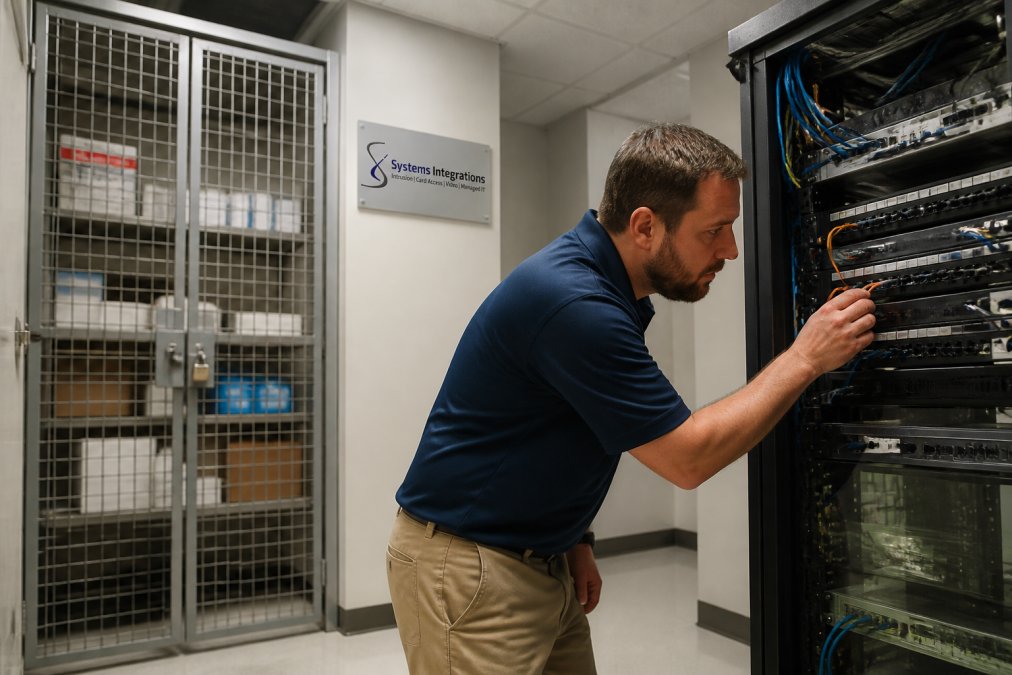
Walk into a typical clinical IDF closet and you will often see this: medical supplies and PPE locked behind a wire cage, while the patch panels, core switches, and structured cabling sit completely exposed in the same room. The supplies are protected. The network carrying every electronic protected health information (ePHI) transaction is not.
Locked Cabinets, Two-Factor Entry, and Why Brass Keys Fail Audits
Dedicated locked server cabinets solve the first layer. Two-factor physical authentication, badge plus PIN or badge plus biometric, solves the second. Brass keys fail audits because they cannot be audited: no record exists of who copied a key or when it was used. A centralized access control system produces a time-stamped log of every closet entry, the evidence an auditor asks for.
High-Risk Zones: Physical Access Control for Pharmacy and Medication Rooms
Pharmacy and medication rooms carry the tightest physical controls in the facility because they sit at the intersection of two regulatory regimes. HIPAA’s facility access controls standard governs the ePHI systems inside, Drug Enforcement Administration (DEA) regulations under 21 CFR Part 1301 govern controlled substances storage, and the Joint Commission examines medication management during survey.
Locking Hardware That Survives a Survey
The door itself is the first control. Most facilities standardize on one of three approaches:
- Electrified cylindrical or mortise locksets with fail-secure operation, so a power loss or fire alarm does not release the door. Fail-safe hardware is appropriate for egress paths, not for a controlled-substance vault.
- Electric strikes on an existing frame, which are cheaper to retrofit but require a frame strong enough to resist forced entry and a strike rated for the door’s fire label.
- Electromagnetic locks rated to the door’s fire assembly, paired with a request-to-exit device and mechanical egress hardware so the door always opens from inside.
Access Lists, Not Access Groups
DEA expectations and Joint Commission standards both point to the same practice: access to a controlled-substance area should be limited to named, authorized individuals, not a department-wide group. The access control system should hold an explicit list of who can enter the pharmacy, reviewed on a defined cadence with a named owner.
Anti-Tailgating: The Control Everyone Skips
A single badge-in for two people defeats the entire access log. Anti-tailgating ensures one credential equals one person through the door. Practical options include:
- Optical or thermal tailgate detection at the door, which counts entries and alarms when two people pass on one credential.
- Mantraps or interlocking vestibules where the second door will not release until the first is secured, appropriate for the highest-risk vaults.
- Turnstiles or full-height portals in high-traffic medication distribution areas.
- Policy and signage as a backstop, not a substitute. “One badge, one person” only works when staff are trained and the behavior is enforced.
Door Forced Open and Door Held Open Alerts
Two alarm types do most of the work in a medication room:
- Door Forced Open (DFO) fires when the door opens without a valid credential, catching the propped door, the forced door, and the door left ajar after a legitimate entry.
- Door Held Open (DHO) fires when the door stays open past a configured threshold, catching the credential-sharing problem where one person badges in and holds the door for a line of coworkers.
OSDP v2 vs. Legacy Wiegand: Why Encrypted Readers Matter
Legacy Wiegand readers transmit credential data in the clear over the reader-to-controller cable. Anyone who can reach that cable, including someone with brief closet access or a ceiling pathway, can capture and clone a card. Wiegand is also unidirectional, so the panel cannot know if a reader has been tampered with, disconnected, or replaced with a skimmer.
A common audit failure is a pharmacy door with a modern reader on a legacy Wiegand controller. The reader looks current, but the credential still travels in the clear. Verify the protocol end to end, not just the hardware on the wall.
Putting It Together
The medication room control stack, from outside in: a rated door with fail-secure locking hardware, an OSDP v2 reader on a supervised controller, an explicit named access list with a documented review cadence, anti-tailgating detection appropriate to the traffic, and DFO/DHO alerts routed to a monitored response. Each layer produces evidence a surveyor or auditor can verify.
NDAA Compliant Surveillance for Healthcare: Why Consumer Cameras Are a Liability
Consumer Wi-Fi cameras have no place in clinical space. Devices sold for home use typically stream to a vendor cloud with no Business Associate Agreement (BAA), may lack firmware update commitments, and often transmit unencrypted or weakly encrypted video. A camera pointed at a medication distribution point or a hallway outside an exam room can capture ePHI, and without a BAA the vendor is not bound by HIPAA.
| Criterion | Consumer Wi-Fi Cameras | Enterprise NDAA Surveillance |
|---|---|---|
| Business Associate Agreement | Typically unavailable | Standard with VMS vendor |
| Video encryption | Often weak or absent | Encrypted in transit and at rest |
| Network placement | Shared or flat network | Isolated non-routable VLAN |
| Firmware lifecycle | Unpredictable | Vendor-managed update path |
| NDAA Section 889 compliance | Not assured | Verified component sourcing |
| Audit trail | Minimal or cloud-only | Centralized, exportable logs |
Healthcare Network Edge Hardening: 802.1X, NAC, and Port Security
Every physical security device is a network endpoint, and every endpoint is an attack surface. Edge hardening means the switch port itself enforces policy, so a device that cannot authenticate cannot reach the clinical network regardless of where it is plugged in. In healthcare, that principle runs into a problem most generic guides ignore: the network edge is crowded with connected medical devices never designed to authenticate.
The IoMT Problem at the Edge
Infusion pumps, patient monitors, imaging modalities, nurse call systems, and building automation controllers often run embedded operating systems that cannot support an 802.1X supplicant. Many were installed before the facility had a NAC program, and some are managed by clinical engineering rather than IT. The result is a common pattern: a well-designed 802.1X deployment gets bypassed because a critical device will not authenticate, so someone creates a policy exception and the port is left open.
- Profile the device before you enforce. Use MAC Authentication Bypass (MAB) with a known-device inventory, or a profiling engine that fingerprints the device by behavior, so the port can be authorized without a supplicant.
- Segment by risk, not by convenience. Put IoMT on its own VLAN or, better, its own virtual routing and forwarding (VRF) instance, with firewall rules that allow only the specific flows the device needs (for example, a monitor talking to its central station).
- Apply the same discipline to security devices. Cameras, access control panels, and intrusion sensors are IoMT too. They should sit on segmented VLANs with the same authentication and monitoring expectations as clinical devices.
802.1X with NAC on Security Drops
802.1X with Network Access Control (NAC) authenticates devices before granting network access, so an unknown laptop plugged into a waiting-area wall jack goes nowhere. On security device drops, the practical configuration is:
- 802.1X for devices that support it, with certificate-based authentication where the device can hold a certificate.
- MAB as a fallback for devices that cannot, with the MAC address tied to a known inventory and a change-control process for new devices.
- Dynamic VLAN assignment so the authenticated device lands on the correct segment automatically, rather than relying on a static port configuration that drifts over time.
- RADIUS logging so every authentication attempt, successful or not, is recorded and reviewable.
MAC Address Filtering and Port Security
MAC address filtering adds a second check on known device inventories. It is not a strong control on its own, because MAC addresses can be spoofed, but it raises the effort required for a casual physical intrusion and catches misconfigured or unauthorized devices. Pair it with port security limits:
- Set a MAC limit per port (commonly one or two) so a single wall jack cannot become a small switch for an attacker.
- Configure the violation action to restrict or shut down the port, and log the event. A port that silently drops extra MACs without an alert is a missed detection.
- Disable unused switch ports administratively. This is the single highest-value, lowest-effort edge control. A live lobby or conference room jack is an open door.
A common mistake is leaving lobby and conference room wall jacks live. Anyone can plug in a laptop, obtain a DHCP lease, and scan the internal network. Disable unused ports and enable port security with a MAC limit before the next audit.
Monitoring the Edge
The edge is only as good as its visibility. Enable logging on authentication failures, port-security violations, and unexpected MAC moves, and route those events to the same monitoring platform that receives your DFO/DHO and camera alerts. An edge control no one watches is a configuration, not a safeguard. Review logs on a documented cadence with a named owner, and treat repeated authentication failures on a clinical device as a maintenance ticket, not just a security event.
Why This Matters for Physical Safeguards
HIPAA’s physical safeguards standard is about limiting physical access to electronic information systems. The network edge is where physical and logical access meet: the wall jack, the switch port, the device that plugs in. Hardening that boundary turns a locked door into a defensible control, because the person who gets through the door still cannot reach ePHI without authenticating.
Your Physical Access Control Audit Checklist for HIPAA Compliance
Use this checklist to walk your own facility before an auditor does. Each item maps to a physical safeguard requirement.
| Audit Item | Pass Criteria | Evidence Required |
|---|---|---|
| IDF/MDF door access | Badge plus PIN or biometric | Access log export |
| Server cabinet locks | Dedicated locked cabinet per rack | Photo and key/card inventory |
| Key management | No unlogged brass keys in use | Key issuance register |
| Pharmacy room access | Named authorized staff only | Current access list |
| DFO/DHO alerts | Enabled and routed to monitoring | Alert configuration screenshot |
| Reader encryption | OSDP v2 on high-risk doors | Panel configuration report |
| Camera BAA | Signed agreement on file | Executed BAA document |
| Surveillance VLAN | Isolated and non-routable | Switch VLAN config |
| Unused switch ports | Administratively disabled | Port status export |
| Log review | Documented monthly review | Signed review records |
Auditors ask for the last review date, not the last configuration date. If your access logs exist but no one has signed off on reviewing them, the control is considered unproven.
Actionable Remediation Steps for Healthcare Administrators
Start with the highest-risk, lowest-effort fixes. These steps follow the order most facilities should take.
- Inventory every IDF and MDF closet and photograph the current state of each rack.
- Install dedicated locked server cabinets where racks are exposed in shared rooms.
- Replace brass key access with badge-based access control on all network closets.
- Add two-factor authentication to closets housing core switches and ePHI systems.
- Upgrade legacy Wiegand readers to OSDP v2 in pharmacy and medication rooms.
- Enable DFO and DHO alerts and route them to your monitoring platform.
- Remove consumer cameras from clinical space and replace with NDAA-compliant enterprise units.
- Execute a BAA with your VMS vendor before any camera records patient-adjacent areas.
- Move surveillance onto an isolated, non-routable VLAN.
- Enable 802.1X with NAC on all security device drops.
- Disable unused switch ports and apply MAC limits.
- Establish a documented monthly access log review with a named owner.
Frequently Asked Questions
What are the HIPAA physical safeguard requirements for server rooms?
HIPAA Physical Safeguards under 45 CFR 164.310 require covered entities to limit physical access to electronic information systems and the facilities that house them, while ensuring authorized access is properly validated. For server rooms, this means locked doors or cabinets, documented access lists, and auditable entry logs. The rule also requires policies for workstation use and security, device and media controls, and contingency plans. Auditors typically check whether access is role-based, whether logs are reviewed, and whether terminated employees still have active credentials. Brass keys and shared PINs fail these checks because they cannot produce an individual audit trail.
Why are consumer-grade security cameras a liability in healthcare?
Consumer Wi-Fi cameras from brands like Wyze and Ring typically lack a Business Associate Agreement (BAA), which HIPAA requires before any vendor handles protected health information. Many also stream video through third-party cloud servers without end-to-end encryption, and firmware updates are inconsistent. If a camera captures a patient in a hallway or a medication room and that footage is stored on a consumer cloud, the facility may be exposed to a reportable breach. Enterprise NDAA-compliant IP cameras, by contrast, support isolated VLANs, ONVIF standards, and vendor BAAs, which keeps footage inside the facility’s compliance boundary.
How does OSDP v2 improve physical access control security?
OSDP v2 (Open Supervised Device Protocol, version 2) encrypts communication between the card reader and the access control panel using AES-128. Legacy Wiegand wiring sends credential data in plaintext, which means anyone who taps the cable with a cheap device can capture card numbers and clone them. OSDP v2 also supports bidirectional communication, so the panel can detect tampering, reader faults, and secure channel status in real time. For healthcare facilities with pharmacy rooms or behavioral health units, that encrypted channel plus real-time supervision closes a well-known attack path that Wiegand leaves open.
What is the role of 802.1X in securing healthcare network drops?
802.1X is a port-based network access control standard that requires any device connecting to a switch port to authenticate before it can pass traffic. In healthcare, this matters because unused wall jacks in waiting rooms, exam rooms, and IDF closets are common entry points for rogue devices. With 802.1X, a laptop or camera plugged into an unauthorized port is denied access until it presents valid credentials. Pair 802.1X with MAC address filtering and disable unused switch ports entirely. Together, these controls enforce least privilege at the physical layer and give IT a clear audit log of which devices connected, when, and where.
How do I audit my facility for HIPAA physical security compliance?
Start with a walkthrough of every IDF and MDF closet. Verify that network racks are in locked cabinets, that access is logged electronically, and that terminated staff no longer have credentials. Check pharmacy and medication rooms for anti-tailgating controls, Door Forced Open and Door Held Open alerts, and current access lists. Review camera placements to confirm coverage of network racks and medication distribution points, and verify that all cameras are NDAA-compliant and on isolated VLANs. Document everything in a physical access control audit checklist, then schedule quarterly re-reviews. Auditors expect evidence of ongoing monitoring, not a one-time fix.
What are examples of cybersecurity best practices in healthcare?
Cybersecurity best practices for healthcare include enforcing multifactor authentication for all administrative accounts, segmenting the network so medical devices and surveillance systems sit on separate VLANs, and applying patch management on a defined schedule. Physical controls matter just as much: locked server cabinets, OSDP v2 readers, and centralized access logs. Employee phishing awareness training and a tested incident response plan round out the program. The HHS 405(d) HICP publication recommends these controls specifically for the healthcare sector, and they map directly to HIPAA Security Rule requirements.
How does physical security relate to ransomware mitigation in healthcare?
An attacker who walks into an unsecured IDF closet can plug a rogue device into an open switch port, bypass perimeter firewalls, and move laterally toward electronic health records systems. That is why ransomware mitigation starts with physical controls. Locked racks, 802.1X port authentication, and surveillance coverage of network closets remove the easiest on-site entry path. Combine those with network segmentation, offline backups, and a tested disaster recovery plan. The 2023 HHS breach portal shows healthcare remains a top ransomware target, and physical access is one of the most overlooked vectors in post-incident reviews.
Can a small healthcare practice afford enterprise-grade physical security?
Yes, but the approach differs from a hospital system. Smaller practices should prioritize the highest-risk assets first: the network closet, the medication room, and any server that stores electronic protected health information. A single locked cabinet, an OSDP v2 reader on the closet door, and one NDAA-compliant camera covering the rack deliver most of the compliance value at a fraction of a full build-out. Consolidating physical security and network management with one integrator also reduces the number of vendors, contracts, and audit touchpoints, which lowers ongoing operational cost.